Total Pageviews

Showing posts with label schools. Show all posts

Wednesday, June 17, 2015

How's the New Job?

For those not familiar, I have taken a new job as the Instructional Technology Specialist at the Shiawassee Regional Education Service District (RESD).  Having been here since April, I have accumulated a number of different thoughts, feelings, implications, etc. that I thought I would use as a kickstart to getting my blog back up and running.  After all, an Instructional Technology Specialist should maintain a blog, right!?
So, as I sit today and mourn the loss of the summer to which I have become very fond of over the past 12 years, I feel the need to share a few of my thoughts.
**Note:  Please pardon the rambling.

1. Teachers work hard!!

As a teacher, you don't think about it; you just do it.  You wake up before the sun, go non-stop for 7+ hours.  You cram lunch/bathroom/phone/social time into a 30 minute span of time when most people are eating breakfast.  You take work home to finish just before crashing to sleep, never knowing what it might be like to consider 9:00 p.m. "Primetime TV" or ever see the end of the big game without a DVR.  And let's not even mention working while you're sick because it's worse to take a day off than to struggle to stand in front of your troops and lead them through a new lesson while trying to block out feeling like you've been hit by a truck.
Not that I'm slacking in the new position, but I have thoroughly enjoyed still having some gas left in the tank for my own kids when I get home at night.  It's been an eye opener to me how much energy I actually put into my job as a teacher, especially considering how many days I ended with thoughts about how much better I could have done that day.

2. ISD's are foreign to most people.

Being that I speak to people from many different states (and countries) from both my family (Ohio) and my wife's circles from all over, a lot of my replies to the title question have been dedicated to explaining what an Intermediate School District is.  I never realized how "Michigan Specific" my job actually is or what a tough concept an ISD is even to someone in education in another state.

3. The Education World is foreign to most people.

It used to be easy... "I'm a teacher."  Pre-conceived notions aside... Done.
The common follow up question to "How's the new job?" is easily "What do you actually do?"  In my head I know my answer is, "I collaborate with teachers across 8 different local districts to more successfully integrate technology tools and applications into their curriculum."  I have quickly learned that this response leads to a cross-eyed, confused look from anyone other than a teacher or school administrator.  My new line has defaulted to "I teach teachers ways to use technology," even though I know this is a gross misrepresentation.  The vast majority of people outside of the world of Education really don't have any idea what goes on, and this has started to scare me.

4. Old habits die hard.

I still find it odd sometimes to be outside of a building at lunch time or to use the restroom at 1:45 without calling someone to cover for me.  I still scarf my lunch as fast as I can, often at my desk.  I still find myself working at a frantic pace through the morning hours, but now I find myself wanting for something to do by the end of the day.  I still get a little bit uncomfortable when the office is quiet without the chaotic classroom buzz right on that fine line between active learning and all hell breaking loose.  I still want to jump out of my seat, immediately, and run to someone who needs help with something.
This isn't all bad; I plan to do my most good in 1:1 settings, running to those who need help, and be more of a "Tech Coach" than a trainer in front of a room of 50 teachers.  I hope I never lose those "old habits" I worked very hard to develop as a teacher.


Photo by Laurie Sullivan, "Discovery Education Orion" December 1, 2014 via Flickr, CC BY

Tuesday, January 13, 2015

And, Moving On... #GEducator

After way too much procrastinating, I've earned my Google Educator Certificate!  Now what?
The training that I was a part of was geared toward becoming a Google Certified Trainer.  This means that I would be endorsed by Google to train other teachers in using Google's tools.  As I have said before, my lack of experience leading professional development sessions puts me at a real disadvantage on this road, and further, it doesn't really fit with my role as a teacher.
In my opinion, as a teacher, the next step is to focus on applying to the Google Teacher Academy.  I think this route fits much more with my actual job, plus, who wouldn't want to spend a long weekend in Mountain View at Google's headquarters with a bunch of exciting people?  Since those dates and applications haven't been released yet for this year, my new focus needs to be increasing my "Googliness" so that I am the type of person Google is looking for in their selection process.  This means continuing some of the things I already do, but increasing the deliberateness with which it is done.  I need to become a bit more active online and in professional groups, and put myself out there a bit more to prepare myself for the application process when it rolls around this spring.
Blogger, Twitter, YouTube, etc., here I come.

Thursday, December 18, 2014

Google Certified?

So at this point I'm back on my own.  The three days of help were awesome, and I learned quite a bit from some of the more advanced bits and pieces that we covered in the training sessions, but now it's all up to me.  I still have a few exams to complete, and I'm not too worried about them.  After getting the first couple of tests under my belt, I feel much more confident, and I don't think they'll be that much of a problem for me.  I just have to find the time (they are time consuming) to sit down and get them done.  The upcoming break will be just the time to get these out of the way and on to the next step.
This next step is the big one for me that I think will be my biggest hurdle in becoming a Certified Google Trainer.  To earn this certification, one of the major requirements is having led training sessions on using Google's products in varied professional settings.  While I do teach with Google Apps every day with my students and also work continually with the teachers in my building on using Google Apps, I don't have much to list outside of that.  I do have one major presentation coming up at the MACUL Conference in March (that I'm super pumped about), but the bottom line is that it's time to start stepping out of my comfort zone and actively seeking presentation and training opportunities outside of my own little bubble.
I'm really looking to expand in this area, and I hope that a couple of connections that I've made this fall as well as some future connections as a result of presenting at MACUL can help out with this, but first things first... Finish the Exams, grrrr.

Friday, November 21, 2014

Exams Here I Come

My procrastination is about to come to an end; it's time to get busy.  My plan is to use a large chunk of my Thanksgiving break to take my exams.  Hopefully over the long break I'll be able to complete multiple exams.  I've heard that they can be a little stressful, but I'm fairly confident I can work my way through multiple tests over the time I have available.  I do have some awesome resources to use, along with the fact that I'm pretty knowledgeable to begin with.
Regardless of how many exams I am able to pass next week, I will definitely have them all passed by the end of 2014 to become an official Google Educator.  After that I can begin to focus on building up a better network and online presence to begin work toward acceptance into the GTA.
Just as an extra little thought, I will keep you guys in the loop for a new class I'm going to pitch to Mr. Heath for next year.  Keep in mind, this is just a thought at this moment, but I'd love to know what you guys think about it.  I was thinking that that a really useful class would be a student version of what I'm doing now as a teacher.  A Google Apps for Students course similar to this one.  The focus would be on all of the technical details and more advanced uses of Chrome, Drive, Mail, Calendar, Sites, and other Google Apps and Extensions.  For anyone interested in getting better with Google tools (I know a lot of university professors are utilizing them for work, especially Drive) I would recommend checking out the site.  I think creating a site like this would be both fun for me and really useful for our school, students, and maybe even teachers looking to learn more about Google Apps.  Thoughts?

Wednesday, November 12, 2014

Google Educator Certification Rolling

So after missing day one of the training our county is providing for earning the Google Educator Certification, I was able to attend day two on Monday this week.  I think I'll be ok after missing day one as Gmail and Calendar were covered, and I'm pretty familiar with those already.  I'll just need to do a little refreshing before I take the exam for those two tools.  I did pick up some good study resources to help out a bit with some of the more advanced features that may come up on the exam.  I'm pretty confident in my Google knowledge though, and I'm not too worried about the actual exams.
This Monday we explored some of the more advanced tools in Google Drive, and I picked up a few new, cool tidbits along with the excitement of just learning it a little better.  The things that have me worried about this exam are 1) the test for Drive will cover a lot of material.  Between Docs, Sheets, Slides, Drawings, and Forms along with all of the different tools associated with each one, there is a lot of material to be knowledgeable of.  And 2) with the recent new update to Drive and the fact that Google is in the middle of updating these exams to reflect this new update, I don't know whether to jump in now and take the old version of the exam or wait for the new version to come out with questions over the "New Drive."  Timing is everything, right?
We also took a very brief look at Google Sites.  I've used Sites a little, but I would consider it the tool that I'm the least knowledgeable of.  I haven't really built a full scale Google Site yet, but I have dabbled and I continue to get better.  If anyone is interested in what I have done, "Sites-wise," feel free to check out the Site I set up to serve as a digital portfolio of my daughter's education.  We started it last year to reduce the amount of paper that our pack-rat daughter thought she had to keep.  It's been fun, but definitely needs some updating done for this year.
All in all, I have a little studying to do, but very soon I'll be jumping in to take these five exams and earn my Google Educator label.  From there, it will come the time to start pursuing acceptance into the Google Teacher Academy.

Wednesday, November 5, 2014

2014 miGoogle Conference


Yesterday I attended the 2014 Michigan Google Summit for Education for the second consecutive year, and it was a great day to see what other teachers are doing with Google products. The day started with Cyrus Mistry, a Chromebook Project Manager at Google, giving a really interesting keynote about many of the things Google is working on and doing for educators. There were a ton of sessions scheduled, and while I think I could have chosen better, I did pick up quite a few new tips and tricks for the work that I do as well as seeing some successful teachers tell about how they have successfully integrated Google's tools to work on cross-curricular projects with other teachers and groups of students. On top of the sessions, as usually happens, I ran into a few people I know and having discussions with them in the in between times was valuable as well. One tool of Google's that is brand new this year and right at the tip of everyone's tongue was Classroom. I was really excited to see Google roll this out over the summer, and I was really eager to play with it. A lot of teachers at the conference have been using it, and it sounds like they are still working on perfecting it. I was a little relieved that I hadn't dived right in so I can use it once a lot of the bugs are worked out. This will be one of my top priorities for next year, especially with my Intro to Computers and Algebra classes. Another priority will be shifting my Intro to Read/Write Web course over to Google Sites from Weebly. It's going to be a lot of work, but in the end it will be very worth it, and there will be a learning curve for students that I hope we can work through. All in all, I had a very productive and exciting day seeing what other teachers are doing and perfecting my use of Google in the classroom. It will definitely help as I get started in the Google Educator Program next week.

Wednesday, October 8, 2014

Lunar Eclipse

So I've been pumped for a week.  I heard about the lunar eclipse last week, and have been hardcore, nerd-style pumped to watch it unfold the whole way I was going to be driving into work this morning.  Plenty of research later, and I had my camera settings ready to get some cool pictures of it along the way.  I shared my nerdiness with my daughter all week, and she was equally pumped.
I headed outside with the camera last night to play with the camera settings a bit more and see how it would go, and I got some pretty cool pictures of the full moon rising as a bonus.
So this morning we woke up stupid early to get on the road to school so that we had enough time to find a dark spot, stop, set up the tripod, and snap a few long exposures.  Grace was giving me updates the whole way as we were driving East and I couldn't see it.  She was pretty awestruck by the whole thing, and that was as awesome to see as the eclipse itself.  The whole way to school she was chewing my ear off about everything she knows about the sun and moon from school.  Makes a teacher proud to hear that stuff and see her curiosity show through.
But anyway, we made a few stops and snapped off a few of the pictures you see below.  It was an awesome morning.  If you didn't get to see it, I hear there are two more eclipses next year, so stay tuned, and get your butt out of bed.  It's awesome to watch.

Saturday, September 27, 2014

#20Time is Rolling

This year's 20% Time Projects are starting to roll in my first hour class.  Students have done some brainstorming and research and made presentations to the class about their project details such as their goal/accomplishment they wish to achieve and their plan to use class time on FLEX days to make that happen.  We are in the process of getting our blog pages set up, and once they are all set and ready to go, I will share those out to an
yone interested.
For my own students reading this, I've been in contact with Mr. Provenzano (the teacher whose student blogs you checked out earlier in the year) and we'll share our students blog links with each other so that you can follow along with their progress as well as having other students following along with what you're doing.  This should be a great year of big things happening in first hour.
For my own 20% Time project, I'll be working alongside my students on a project of my own.  I had already planned on pursuing a Google Teacher Certification this year.  A fantastic opportunity has come up from our ESD to offer support for the first portion of this journey with help in taking Google's courses and passing the exams to become a Google Educator.  Once this step is complete, my time will be focused on implementation and experimenting with more of Google's Apps and preparing an application for one of the yet to be announced Google Teacher Academy sessions next year.
Stay tuned here for reflections on my students' work as well as progress updates on my own 20% Time Project.

Thursday, October 25, 2012

#FlipClass Experiment Series - Why Flip?

One of the questions I get a lot is, "Why would you want to flip your class?"  I have a few reasons, from my personal experience, for wanting to flip my classroom, and of course I'll share them with you.
After moving toward this method of teaching last year I found that by saving as much time as possible during class for actual work I got to do way more quality teaching than I ever did in the past.  Students were engaged and busy during class, and with me not wasting time preaching from the front of the room to a disinterested audience, I got to spend my time teaching students what they needed and wanted to know through a series of teachable moments with interested students.  I love teachable moments, and I have found that the more time you have in class for one-on-one help, the more teachable moments you seem to have.
Next, students gain a lot of understanding through the video instruction.  As opposed to a classroom lecture, students have the ability to pause me while taking notes and rewind to hear something again.  In addition to this, they like the fact that they are watching a video instead of sitting still and shutting up.  They've had enough of that, and my videos are different and therefore "cool."
I also go back to my college days and think of the lovely "Dale's Cone of Experience" and consider the implications of (a) using videos to present lecture content, (b) using class time for more active work, and (c) incorporating collaborative, project-based activities in class.  I'm moving my class further down the cone by not having them "Read Section 2.4" or sit and listen to me preach.
Lastly, from a more practical and less theoretical viewpoint, I am teaching my students much more than just the Algebra I content expectations.  They are picking up an invaluable life lesson in their taking ownership of their own education.  They are learning a lot about knowing what they do and don't know as well as options they have to do something about it.  They are learning, through the use of Khan Academy, that education is valuable and becoming increasingly more available and free for those who thirst for knowledge.  And, they are learning to learn through the use of some 21st century tools that are becoming the norm in higher education.
I feel like I could ramble forever on this topic, and it is one that I love, but these are my big reasons for flipping my class.  Hopefully my enthusiasm continues to rub off on my students as the year progresses out of the first marking period.

Image By Jeffrey Anderson [CC-BY-SA-3.0 (http://creativecommons.org/licenses/by-sa/3.0)], via Wikimedia Commons

Wednesday, October 10, 2012

#FlipClass Experiment Series - Flip What?

As I've been writing a few posts about flipping my Algebra I class, it occurred to me that some in my audience might be a little lost on what a flipped classroom actually is, so let's break this down.  In a flipped class, students use classroom time to complete what used to be homework and time outside of class to receive instruction in the form of what used to be a classroom lecture.  The passive stuff, like lectures, are completed independently at home while classroom time is devoted to more active tasks like project-based learning, practice assignments, group work, etc.
My classroom operates in the following format:

  • Lectures are delivered in the form of streaming videos that I link to from a couple of sources.  I use a mix of videos from Khan Academy and my own screencast recordings explaining different concepts.  Students are expected to view these videos either at home or outside of our regular meeting times, and they are responsible for the content presented in much the way students are responsible for reading material from a text.
  • We start each Quarter with all assignments for the Quarter up front (see image below), and students can work through the material and assignments at their pace (with deadlines).  Assignments vary from completion of Khan Academy modules to paper and pencil assignments to collaborative problem solving activities to larger scale, long-term projects to Chapter Tests.

  • Class time is used predominantly for working through assignments while leaving loads of time for one-on-one help where students get stuck.  On any given day in my classroom, I may have students working on various Khan Academy Modules with a few taking their Chapter Test while another group is working on a project together in the corner.  It can seem chaotic at times, but you can feel the learning happening.

Sunday, October 7, 2012

#FlipClass Experiment Series - Access

Since this whole idea of flipping a classroom is fairly new in education, of course there are going to be plenty of issues and growing pains that come up along the way.  The biggest concern I have had raised in my work in flipping my class is access.  I have had questions raised from everyone from administrators to parents to students to other teachers looking to flip their classrooms, and every single group has raised the issue of access.  For some school districts this won't be as much of a concern, but teaching in a rural area means I have to be aware of and sensitive to the fact that not everyone has access to a high speed internet connection when they leave the school building.  I have found the following in my experience:

  • The issue of access to high speed internet is not as prevalent as some might make it out to be.  I teach in a district that is designated as a low-income district, and I thought this was going to be a huge hurdle, but it wasn't.  While I do have some students without internet at home, there are not as many as I thought there would be.  High-speed internet is becoming the norm, even in rural areas.  You'll still need to account for this, but lack of access is definitely becoming the exception, not the rule.
  • Some students without internet access still have a computer in the home.  I have a few students for whom I download classroom videos to a flash drive and send the videos home that way.  If students have a computer, just no internet... no problem.  They can still receive the content.
  • Keeping the computer lab open at school as much as possible is mandatory.  I arrive at least 30 minutes before the school day kicks off each day and usually around an hour after school to allow students to have time with internet access if they need it.
  • Surprisingly, a growing number of students with no high speed internet at home have access to mobile devices that will work over a wi-fi network.  Our school is working on an open wi-fi network to allow students to bring their own devices, and many students will hit up the McDonald's with their smartphone to get the access that they need.
Requiring access to a high speed internet connection can be a tricky move, and if not done with tact, can definitely ruffle some feathers.  If you're thinking about flipping your class, make sure you plan ahead and are prepared for this issue to come up... because it will.

Tuesday, September 25, 2012

#FlipClass Experiment Series

So my Intro to the Read/Write Web students begin blogging this week, and as The Nerdy Teacher suggested in a post on Edutopia, I'm going to pick my blog back up to serve as a model for my students.  As I considered this reentry to the blogging community, I thought I would take the advantage this time to document my work in "Flipping" my Algebra I course for this school year with a series of posts about my experience.  Hopefully my students will take something away from reading my posts, but what would make me even happier is if someone reading this finds my experiences useful.  Of course I would love to hear comments from any new followers I might pick up to help me hone my skills in this new venture.
As an introduction to where I stand, I began incorporating lessons and practice modules from Khan Academy into my Algebra I course last year since I had been moved into a computer lab to teach.  The use of these resources gradually grew to be more of a part of the everyday class as the year progressed, so I took the next step for this year and decided to fully flip my class.  I spent some time over the summer organizing the course, and already have made some major changes after only a month in the classroom.  I'll talk in more detail about these, along with what seems to be working (and not working), and all of the further changes that are sure to come around, later on.
These posts will be mirrored on the site I use to teach my Intro to the Read/Write Web course in Weebly where my students will be able to view them and leave their comments, but I look forward to any professional comments on this site so please comment away.  I'm also going to try to stick to the assigned theme I give to my students each week, so I apologize ahead of time for any scattered thoughts.
I'm really excited to be blogging again looking forward to documenting this experiment in flipping my classroom.  Thanks for reading, and please feel free to share.

Sunday, March 11, 2012

Follow-up

After my last post, I thought I should follow up a bit.  I sent my last post to my principal, and it started a much needed discussion/debate.  To set-up his response, he's very hard line against social networking and mobile devices in school.  I've spoken with him at every opportunity about the need and benefit of using these resources in school, and we've developed an ongoing, fun argument about it.  I get where he's coming from, to a point, and he definitely has the best interests of his student body and their education in mind.  He has allowed students in my classes to use their mobile devices while they are in my classroom, and I see this as a compliment to my teaching ability since it is so far out of his comfort zone.
My principal quickly shot back at me last week that we should have a debate about it, and while he was confident that I would oversee the use of social networks adequately and teach students to use them appropriately, he couldn't say the same for every other teacher.  I understand this, and this led to the bigger problem behind the problem that leads to the outright ban of these sites:  network rights.  My side of the debate brought up the fact that Chemistry teachers frequently use hydrochloric acid in their classes, even though it can be very dangerous.  But, because those teachers are qualified to oversee its use, we allow it because it is in the best interests of our students' education.  The problem is that hydrochloric acid is really easy to keep in the chemical locker while network rights to access Facebook, Twitter, etc. isn't currently easy to keep locked up in the computer lab.  As our network stands now, they are either accessible from our entire network or none of our network.
Grumble, grumble, debate more, grumble, grumble.
However far away the prospect of having the ability to teach my students what they really need to know may be, at least I can keep it front and center by continuing to bring it up and keep it in the conversation.  And, we know what we need to look at as a school; who knows, maybe sometime soon on our network, it will be possible to make certain machines in our building have different filter restrictions than others.  Let's make it a priority to find a way to allow the use of these "volatile chemicals"while still being able to keep them in the "social network chemical locker."

Wednesday, March 7, 2012

Social Networking: Come on Schools

Recently I decided, after hearing complaints from board members and parents, to browse around Twitter and see what my students were up to.  Holy cow; was I ever disappointed!  To set things up, a little background.  I do not have a Facebook account; I've never seen any need for it.  I do use Twitter, however, and I follow some friends and use it to keep up with news and posts about education and technology.  I don't post much, and I use it mostly for entertainment rather than business.  Since Twitter has exploded in popularity recently among our students, I decided to spend some time browsing around.
At first I was extremely disgusted with my students because of what I found.  I found more inappropriate language than I could have imagined, Jr. High students posting personal/objectionable information, sisters telling each other not to share with parents that they have these accounts, mentions of drug use, profanity, etc.  Simply appalling.  Thoughts running through my head varied from, "I should email screenshots to parents" to "Did these students not hear anything I said about internet safety" to "Don't these students realize that any future employer is going to be heading straight to what I was looking at upon application for a position and decide quickly not to hire them?"
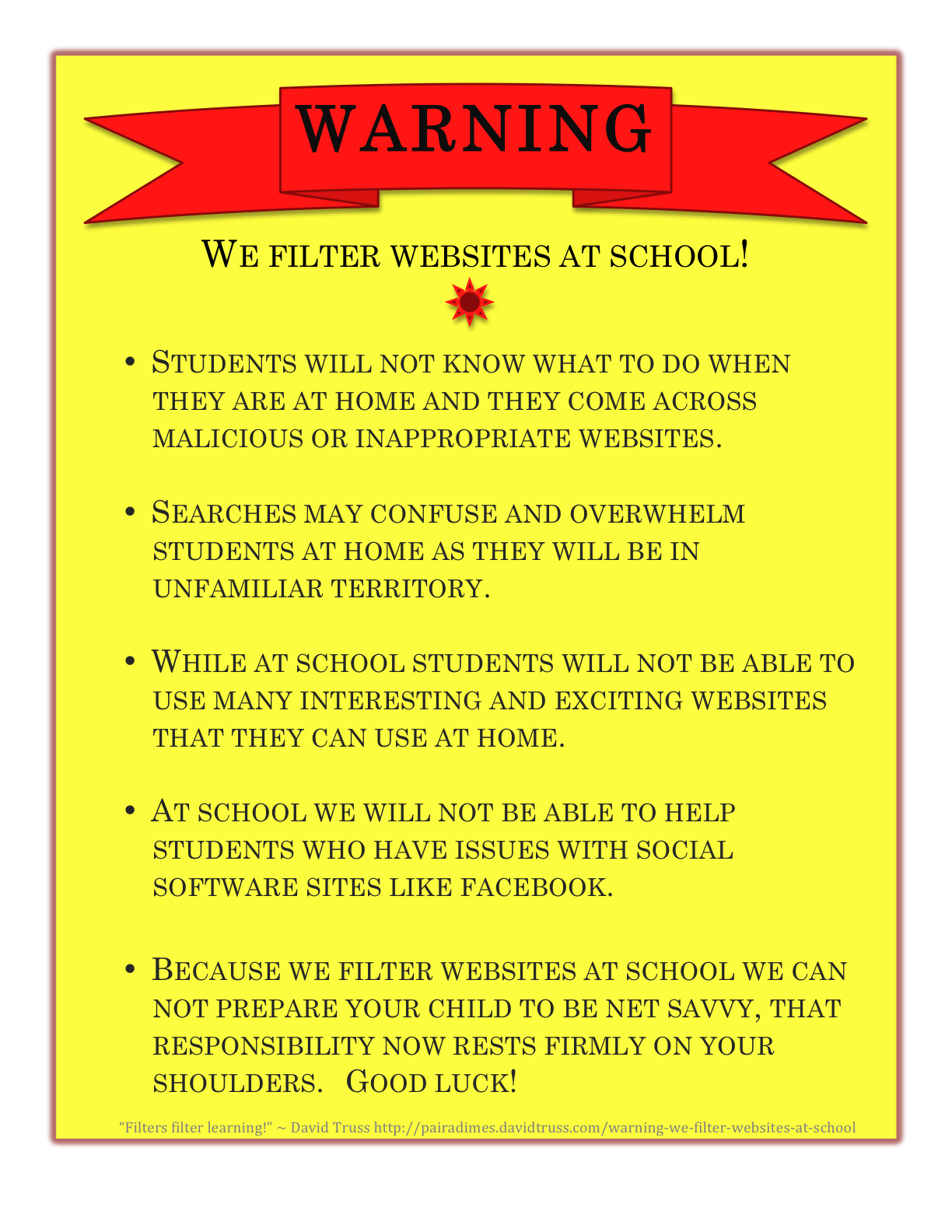
But fairly quickly my disgust shifted from these students to what we do as a school... All social networks are flat out blocked and disallowed during the school day.  A while back, Scott McLeod posted a reference to this poster on his Mind Dump directed at this problem exactly.  It comes from David Truss, who also writes excellent analogies out of frustration with this same issue.
I quickly came to this analogy:  Social networking is like a jar full of candy.
What we do now, even in school, is teach students the benefits of eating healthy.  We allow them to eat real candy, but we teach them how to do it appropriately and in moderation.  We don't confiscate every Dum Dum that comes through our doors, but rather, we often use candy as a reward.  We teach them about the dangers of tooth decay and ways to avoid it.  We teach them about obesity and diabetes and their link to sugary foods.  Sure, candy can be bad for you, but we educate on the appropriate use of candy in order to avoid these issues.  It's called Health class.
On the other hand, with the Social Networking Candy Jar, we have shown it to students but repeatedly told them "No, you can't have ANY."  We keep that jar of candy just out of reach of students and pretend it isn't there (but students know it is).  We ignore it to the point that we don't even educate students on the benefits and dangers of it.  So, as soon as we are out of sight, students are digging into this Social Networking Candy Jar.  They're eating until their stomach aches and their teeth are falling out.  They don't know that this will  affect their future.  And even though we know students are are doing this, we just pretend they aren't and continue ignoring the problem and standing by our line of "Don't eat the candy."
Come on schools, get with it.  Broad internet filters and banning of Social Networking altogether isn't working.  Our students are involved with it.  The least we could do is educate them.

Image: David Truss, "Warning - We Filter Websites At School!" March 5, 2010 via Flickr, CC BY NC SA